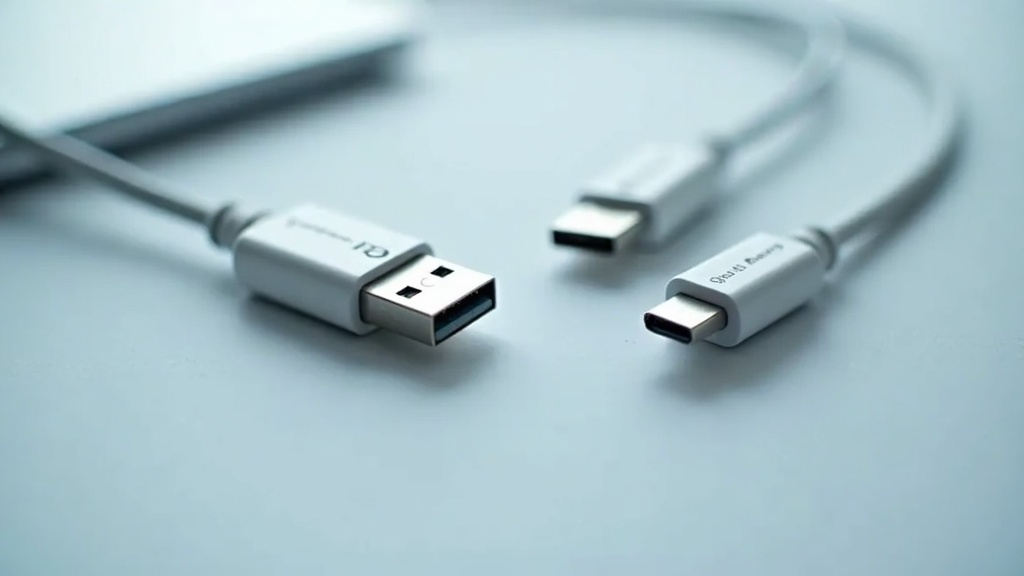
This practical guide to usb cables and adapters for beginners explains the essential differences between connector types, data speeds, and power delivery ratings, helping you choose the right cable for every device without damaging your electronics or wasting money on unnecessary upgrades.
Table of Contents
- What Are USB Cables and Adapters?
- Connector Types and Shapes
- Data Speed and USB Generations
- Power Delivery and Charging
- Frequently Asked Questions
- USB Cable Comparison
- Practical Tips for Beginners
- Key Takeaways
Quick Stats: USB Cables and Adapters for Beginners
- Global shipments of devices with USB‑C ports are forecast to reach 5.0 billion units in 2025, up from 3.6 billion units in 2023 (IDC, 2024)[1]
- 92 percent of new laptops shipped worldwide in 2024 include a USB‑C port (Statista, 2024)[2]
- 54 percent of consumers surveyed in 2024 were unsure of the difference between USB‑A, USB‑C, and micro‑USB cables (CTA, 2024)[3]
If you have ever stared at a drawer full of tangled wires wondering which one charges your tablet or transfers photos from your camera, you are not alone. USB cables and adapters for beginners can feel confusing because the same small port sometimes does different things. The good news is that the technology has become more unified in recent years. This article explains everything you need to know about USB cables and adapters for beginners, from the physical shape of the connector to the speed of data transfer and the amount of power a cable can deliver.
What Are USB Cables and Adapters?
USB stands for Universal Serial Bus, a standard that defines how devices connect, communicate, and supply power through a single cable. USB cables and adapters for beginners serve two main purposes: moving data between devices (like a phone and a laptop) and charging batteries. A USB adapter is a small dongle that converts one connector shape to another, such as USB‑C to USB‑A, so you can use a newer cable with an older device or vice versa.
Hardware engineer Jacob Rosenthal explains a common beginner mistake: USB‑C is just the shape of the connector. Beginners often confuse the connector type with the USB version, but speed and capabilities still depend on the underlying USB standard and the cable you buy.
(iFixit, 2024)[4] This means that buying a cable with a USB‑C plug does not guarantee fast data transfer or high-power charging unless the cable itself is built to support those features.
When you shop for USB cables and adapters for beginners, you will encounter three main variables: the shape of the plug on each end, the USB generation (which determines data speed), and the power delivery rating (which determines charging speed). Each of these is explained in the sections below. A 2024 survey by the Consumer Technology Association found that 54 percent of consumers were unsure about these differences (CTA, 2024)[3], so you are in good company if you are just starting to learn.
Connector Types and Shapes
USB‑A
USB‑A is the rectangular, flat connector that has been the standard for over two decades. You will find it on the host end of most cables – the end that plugs into a computer, wall charger, or power bank. USB cables and adapters for beginners often include a USB‑A to USB‑C cable because the USB‑A end connects to older chargers or computers that lack USB‑C ports. USB‑A connectors are not reversible; they only insert one way.
USB‑C
USB‑C is the newer, oval-shaped connector that is reversible – it works no matter which side faces up. It is rapidly becoming the universal port for smartphones, laptops, tablets, monitors, and even some gaming consoles. By 2024, USB‑C ports were present on an estimated 92 percent of new laptops shipped worldwide (Statista, 2024)[2], and global shipments of devices with USB‑C ports are forecast to reach 5.0 billion units in 2025 (IDC, 2024)[1]. USB‑C can carry data, video, and power through a single cable, which is why USB cables and adapters for beginners increasingly focus on this connector.
Micro‑USB
Micro‑USB is a smaller, older connector that was common on Android phones, Bluetooth speakers, and other portable electronics before USB‑C took over. While 65 percent of smartphone models released globally in 2024 use USB‑C (GSMA Intelligence, 2024)[5], you may still have older devices that require micro‑USB cables. Adapters convert micro‑USB to USB‑C or USB‑A, extending the life of legacy gadgets without forcing you to buy new cables for every device.
Data Speed and USB Generations
The connector shape does not tell you how fast data moves. That depends on the USB generation, which is a technical specification written into the cable and the device ports. USB cables and adapters for beginners should always be matched to the highest generation your device supports. The table in the comparison section below shows the different speeds.
USB 2.0 is the slowest common standard, with a maximum data rate of 480 Mbps. It is still fine for keyboards, mice, and charging cables where you do not transfer large files. USB 3.0 (now called USB 3.2 Gen 1) reaches 5 Gbps, while USB 3.2 Gen 2 reaches 10 Gbps. The fastest consumer standard available today is USB4 Version 2.0, which doubles the maximum data transfer rate to 80 Gbps over USB‑C cables (USB‑IF, 2024)[6]. This matters for external SSDs, high-resolution monitors, and video production workflows.
Jeff Ravencraft, President of the USB Implementers Forum, explains: USB4 is designed to simplify the USB ecosystem and deliver more robust performance by consolidating the best of existing USB and Thunderbolt protocols into a single, scalable solution.
(USB‑IF, 2024)[6] For beginners, this means that a cable labeled USB4 can handle almost any device you plug into it, but you still need to check that your computer and peripheral also support that generation.
A 2025 support survey found that 37 percent of beginner users who experienced connection problems were using cables that did not support the required USB version or power rating for their device (StarTech.com, 2025)[7]. Checking the generation label on the cable packaging or the device manual can prevent most of these issues.
Power Delivery and Charging
Beyond data, USB cables and adapters for beginners must handle power safely. The USB Power Delivery (USB‑PD) standard allows cables to negotiate how much electricity flows between a charger and a device. The latest specification, USB Power Delivery 3.1 Extended Power Range, allows USB‑C cables to deliver up to 240 watts (USB‑IF, 2024)[8]. This is enough to charge most consumer laptops and even some monitors through a single USB‑C cable.
Not all USB‑C cables support 240 W charging. Many standard cables are rated for 60 W or 100 W. The average retail price of a certified 1‑meter USB‑C to USB‑C cable capable of 100 W charging in the U.S. market was $12.40 in Q4 2024 (NPD Group, 2024)[9], making high-quality beginner-friendly cables relatively affordable. Benson Leung, a senior software engineer on the Google Chrome OS power team, advises: For beginners choosing USB‑C cables, the most important thing is to buy certified products from reputable brands so you can trust the cable to negotiate power correctly and not damage your devices.
(Reddit AMA, 2024)[10]
USB‑IF reported that by late 2024 more than 2,500 USB‑C cables and charger models had passed official USB‑IF certification (USB‑IF, 2024)[11]. Look for the certified logo on the packaging or the product listing. This guarantees that the cable has been independently tested to handle the power and data speeds it advertises. The European Union’s common charger directive requires that by the end of 2024 at least 80 percent of new portable electronic devices sold in the EU market use USB‑C for wired charging (European Commission, 2024)[12], which further drives the need for reliable USB cables and adapters for beginners.
If you are still unsure which cable matches your setup, consider reading our best karmacraftscorner guide for more context on choosing the right accessories for your trading and crypto devices.
Important Questions About USB Cables and Adapters for Beginners
Can I use any USB‑C cable to charge my laptop?
No. While USB‑C is the correct connector shape, the cable must support the power delivery rating your laptop requires. Most ultrabooks need 45 W to 65 W, while larger laptops may need 100 W or more. If you use a cable rated for only 60 W with a laptop that needs 100 W, the laptop will charge slowly or not at all. Always check the wattage printed on the cable or its packaging.
What is the difference between USB‑C and Thunderbolt?
Thunderbolt is a higher-performance standard that uses the same USB‑C connector shape. Thunderbolt 4 and Thunderbolt 5 support data speeds up to 40 Gbps and 80 Gbps respectively, along with video output and power delivery. USB‑C cables that are not Thunderbolt certified may still work for charging and slower data, but they will not reach Thunderbolt speeds. Beginners who do not need ultra-fast external storage or multiple 4K monitors can safely use standard USB‑C cables.
Do I need a special cable for fast charging my phone?
Most modern smartphones support fast charging through USB Power Delivery or proprietary standards like Qualcomm Quick Charge. For USB‑PD fast charging, you need a cable that supports at least 18 W to 30 W power delivery. Many USB‑C to USB‑C cables sold today support 60 W or higher, which is more than enough. Check your phone’s specifications to see the maximum charging wattage it accepts, then buy a cable rated for at least that amount.
Are USB adapters safe to use with high-power devices?
Yes, as long as the adapter is rated for the same or higher power level as your device. A USB‑C to USB‑A adapter that only supports USB 2.0 data speeds may still pass charging current, but it could limit the charge rate. For high-power laptops or fast-charging phones, use a certified adapter that explicitly lists its power delivery rating. Avoid cheap, unbranded adapters that do not carry certification logos.
USB Cable Comparison
Choosing the right cable means understanding how connector shape, data speed, and power delivery work together. The table below compares the most common scenarios for USB cables and adapters for beginners.
| Cable Type | Connector Shape | Max Data Speed | Max Power Delivery | Best For |
|---|---|---|---|---|
| USB 2.0 (USB‑A to Micro‑USB) | USB‑A to Micro‑USB | 480 Mbps | 10 W (5 V, 2 A) | Older phones, Bluetooth speakers, low-power peripherals |
| USB 3.2 Gen 2 (USB‑C to USB‑C) | USB‑C on both ends | 10 Gbps | 100 W (USB‑PD) | External SSDs, fast charging phones and laptops |
| USB4 Version 2.0 (USB‑C to USB‑C) | USB‑C on both ends | 80 Gbps | 240 W (USB‑PD 3.1 EPR) | High-resolution monitors, video editing, future-proof setups |
Practical Tips for Beginners
USB cables and adapters for beginners do not need to be complicated. Follow these simple guidelines to avoid common mistakes and save money.
- Buy certified cables. Look for the USB‑IF certified logo on the packaging or product page. Certified cables have been tested for safety and performance. Over 2,500 certified models are available (USB‑IF, 2024)[11], giving you plenty of reliable options.
- Match the cable to your device’s needs. Check the manual or the manufacturer’s website for the USB generation and power delivery rating your device supports. A $12 certified 100 W cable (NPD Group, 2024)[9] is often all you need for a modern laptop and phone.
- Use adapters instead of buying multiple cables. Technology journalist Stacey Higginbotham recommends:
For most beginners, a good rule of thumb is to standardize on USB‑C where you can, then use simple adapters for legacy devices instead of buying a different cable for every gadget.
(Stacey on IoT, 2025)[13] A USB‑C to USB‑A adapter costs a few dollars and lets you use one cable for both old and new devices. - Avoid very long cables for high-power charging. Cables longer than 2 meters can experience voltage drop, which reduces charging speed. For fast charging, use a 1‑meter or 1.8‑meter certified cable from a reputable brand.
For more insights on selecting the right gear for your trading setup, check out our article on masters golf tournament leaders to see how reliable connectivity supports your workflow.
Key Takeaways
USB cables and adapters for beginners are simpler than they first appear. Focus on three things: the connector shape (USB‑A, USB‑C, or micro‑USB), the USB generation (which controls data speed), and the power delivery rating (which controls charging). Buy certified cables from reputable brands, use adapters to bridge old and new devices, and always check your device’s specifications before purchasing. For a curated selection of high-quality USB cables and adapters for beginners, explore our recommended products that match every common scenario. To learn more about building a reliable home office or trading station, visit tradelivingreview.com for practical guides and reviews.
Useful Resources
- IDC Press Release: USB-C Device Shipments Forecast 2024.
https://www.idc.com/getdoc.jsp?containerId=prUS52012324 - Statista: Share of New Laptops with USB-C Port Worldwide 2024.
https://www.statista.com/statistics/1418594/share-laptops-usb-c-port-worldwide - Consumer Technology Association: USB Cable Consumer Survey 2024.
https://www.cta.tech/resources/newsroom/media-releases/2024/usb-cable-consumer-survey-2024 - iFixit: Understanding USB‑C: Connector vs. Capability.
https://www.ifixit.com/News/usb-c-beginners-guide - GSMA Intelligence: USB-C Smartphone Charging Report 2024.
https://www.gsmaintelligence.com/research/2024-usb-c-smartphone-charging-report - USB Implementers Forum: USB4 Version 2.0 Specification Press Release.
https://www.usb.org/sites/default/files/2024-10/USB4v2-press-release.pdf - StarTech.com: 2025 USB Cable Support Survey.
https://www.startech.com/en-us/insights/2025-usb-cable-support-survey - USB Implementers Forum: USB Power Delivery 3.1 Specification.
https://www.usb.org/document-library/usb-power-delivery-31-specification - NPD Group: USB Cable Accessory Pricing Trends 2024.
https://www.npd.com/news/entertainment/2024/usb-cable-accessory-pricing-trends-2024/ - Reddit AMA: USB‑C and USB‑PD Cables and Chargers Explained.
https://www.reddit.com/r/Google/comments/1bq9t3k/ama_usb_c_and_usb_pd_cables_and_chargers_explained/ - USB Implementers Forum: USB Certified Products List.
https://www.usb.org/usb-certified-products-list-usb-c - European Commission: Common Charger Directive Press Release.
https://ec.europa.eu/commission/presscorner/detail/en/ip_24_6789 - Stacey on IoT: Podcast Simplifying Smart Home Cabling 2025.
https://staceyoniot.com/podcast-smart-home-cabling-2025